
Guide
B1 · Intermediate
Reading
English App Error Messages: Understand the Problem and the Next Step
Read status, warnings and next steps in six original simulated app messages while separating explicit evidence from technical guesses.
8 min read
1,375 words
Updated Oct 20, 2026

On this page (7 sections)
B1 • 17 minutes • 8 scored checks. Read status, warnings and next steps in six original simulated app messages while separating explicit evidence from technical guesses.
Read a message before reacting
This guide uses a fictional note-taking app called Pebble Notes. Its screens are reading examples, not working controls. You will not sign in, change settings or remove files. The aim is to understand what an English message says before deciding what information is missing.
Read in three parts: problem, consequence and next step. The problem names the current state, such as a lost connection. The consequence explains what is affected, such as the latest edits remaining unsaved. The next step tells you what the message supports doing next within the simulation. Not every message contains all three parts.
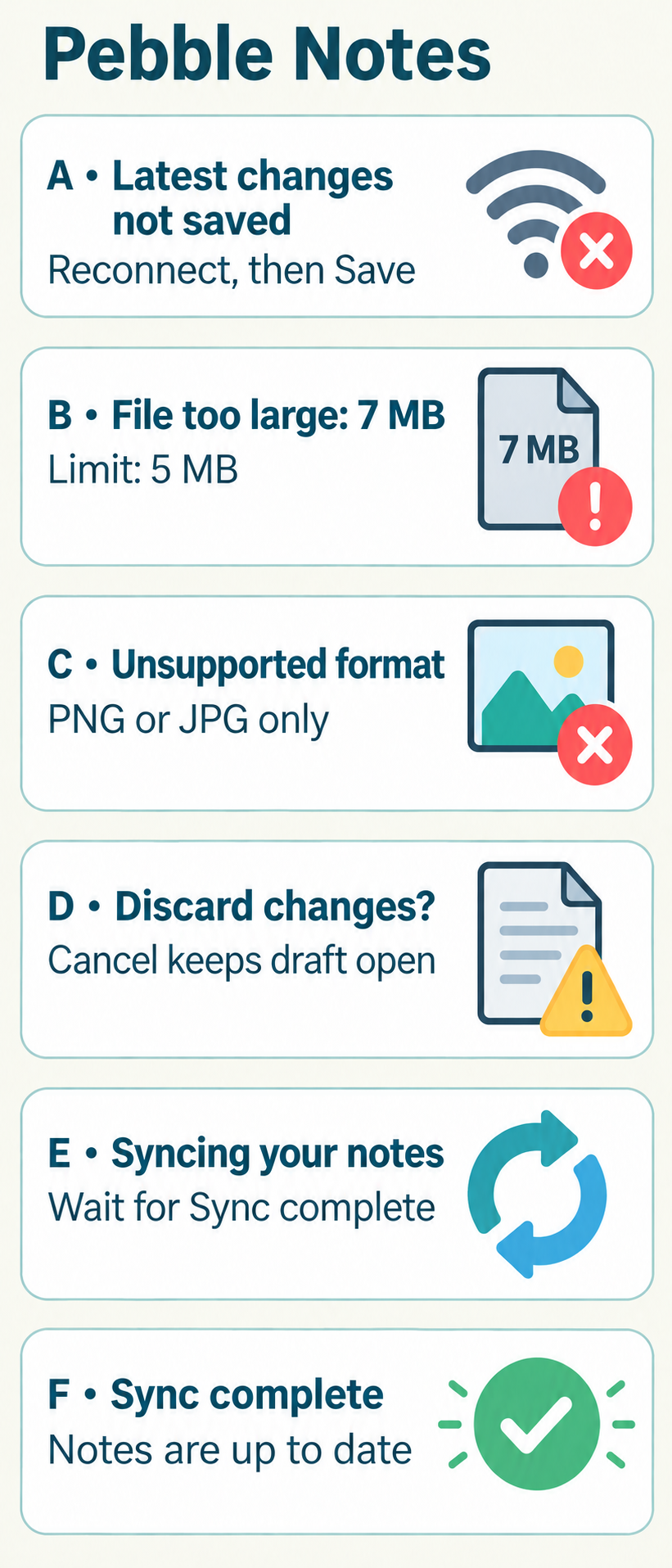
Card | Exact simulated message |
|---|---|
A • Unsaved | Your latest changes have not been saved. Reconnect, then select Save. |
B • Size limit | File too large: 7 MB. The limit is 5 MB. Choose a smaller file. |
C • Format | Unsupported format. This app accepts PNG or JPG images only. |
D • Warning | Discard changes? Continuing removes the unsaved changes from this draft. Cancel keeps the draft open. |
E • Progress | Syncing your notes. Keep this simulated window open until Sync complete appears. |
F • Complete | Sync complete. All notes in this workspace are up to date. |
Common digital status vocabulary
Saved means the app reports that information has been stored. Unsaved means some information has not yet been stored in the stated place. The chunk have not been saved in card A means the latest changes are not saved yet. It describes the current result; it is not proof that older saved notes have disappeared.
Upload means send a file to the service named in a message. Download means receive a file from it. Sync, short for synchronise, describes bringing copies up to date. Syncing is in progress; Sync complete reports completion. A connection links the app to a service. Unavailable means a function cannot currently be used; retry or try again means attempt the action once more. These words do not identify a technical cause on their own.
File and connection limits
File too large compares a file's size with an explicit limit. In card B, 7 MB exceeds the stated 5 MB limit. You do not need to know how the app stores files to understand that comparison. A smaller file addresses the named issue; a password change is unrelated to the message.
Unsupported format means the app does not accept that file type for this action. Card C names PNG and JPG images only. It does not say the file is dangerous or damaged. Connection lost identifies a connection problem, but does not by itself say who caused it or whether every previous save failed. Keep your explanation as narrow as the source.
Warnings and choices
Buttons use short verbs. Cancel usually stops the proposed action in that particular dialog; check what the sentence says it cancels. Continue goes ahead with the described step. Discard means get rid of the named changes or object. Try again repeats an attempt. The consequence belongs to the current dialog, not to every screen using the same button label.
Card D is a simulated warning. Continuing would remove unsaved changes from this draft; Cancel keeps it open. The warning does not say that all notes will disappear. Read both the action and its object before making a language choice.
Follow a short help sequence
Pebble Notes help panel: Step 1: Read the exact message and identify the affected draft or file. Step 2: For card A, reconnect first, then select Save; for B, choose a file within the size limit; for C, choose an accepted image format. Step 3: Read the new status. Stop this help sequence when Saved or Sync complete explicitly confirms the action you attempted.
This is a branching sequence, not a list of actions to perform in every case. Reconnect belongs to the unsaved connection message. Choose a smaller file belongs to the size message. A format message calls for an accepted type. Even after the matching step, look for the new result; an instruction to save is not itself confirmation of a save.
What the message does not establish
A message can leave questions unanswered. Syncing your notes does not give a completion time. Unsupported format does not state that the account is blocked. The latest changes have not been saved does not state whether a version from yesterday still exists. If the text does not establish something, write not stated rather than making a technical guess.
Compare an observation with an explanation: the message says 7 MB is too large is supported; the app is broken is not. A useful issue summary quotes the exact message, names the attempted action and reports the visible status. It avoids passwords, private note contents and blame. For actual service problems, use the service's official help.
Eight checks and a safe reading checklist
Complete eight checks from the six cards. Three focus on status, two on warning consequences and three on supported next steps. Answer before opening the feedback. The explanation quotes the exact words that support the answer rather than supplying general technical advice.
Use this reading checklist on a future message: identify the affected item; separate current status from a proposed action; read the consequence; follow the stated sequence; then look for an explicit result. If the text leaves an important question unanswered, ask for clarification in official help instead of inventing the missing detail.
Answer on paper, then open the explanations below. Enable JavaScript to check answers here.
Your turn · self-review
Your transfer task
Write your own response first, then open the model and compare. Check: exact current status; supported sequence; no invented cause or claim that older notes are lost.
Practice only. Your writing stays on this page; it is not submitted or saved.
-
Model answer and explanation
The latest changes in the fictional draft have not been saved. The message says to reconnect and then select Save, but a later success message has not yet been shown.
Related Guides






Continue learning this topic
Review an explanation, study examples or try a related practice test.
- Practice test Japan Sends Spacecraft Toward Phobos to Collect the First Samples From a Martian Moon — B2 English Listening Practice Test
- Practice test Japan Sends Spacecraft Toward Phobos to Collect the First Samples From a Martian Moon — B2 English Grammar Practice Test
- Practice test Japan Sends Spacecraft Toward Phobos to Collect the First Samples From a Martian Moon — B2 English Vocabulary Practice Test